Zobiki the innovative decentralized secure backup for your wallet keys - Home

zobiki, the decentralized innovative backup for your wallet keys
Why zobiki
The use of digital wallets, and the adoption of crypto currencies is increasing constantly. With the release of the EUDI Wallet soon, (https://bmds.bund.de/themen/digitaler-staat/digitale-identitaeten/eudi-wallet) more and more people need to have a backup system for their credentials. Safeguarding your assets is becoming a necessity. Despite the need for a backup system for your wallet keys, the existing methods are either clumsy or inherently unsafe. Many wallet already exist, like the Lissi or the Namirial wallets and in all of these cases there isn't a solution for backing up the key. Zobiki connects the latest technologies such as decentralization with steganography, an image manipulation process, to provide a reliable and safe backup system for your wallet keys. Safe, decentralized and easy to work with.
Decentralized
As a fully decentralized storage system, the key is never stored as a whole in a central point, but it is split in two parts. Only when the two parts come together the key is restored. One part is the image belonging to you, the other is a list of points stored on our cloud servers. Neither piece taken apart can lead to the key, but when are merged together they reveal the stored key.
Innovative
We use an old technology called steganography, to random pick pixels from an image and use those to store some kind of information. However, Instead of writing the values back onto the image, as a classical steganography process would, we just pack the pixels and store them on our server.
Secure
On our server we store a set of pixels we got from your image. We do not have the image as this is only processed in your local browser. So even if someone impersonate you and get access to the pixels, these produce nothing as they do not contain any information about your key.
Backup

Step 1
Select an Image.


Step 2
Enter your key.

Step 3
Backup done.
Restore
Step 1
Select the same image.
Step 2
We restore your key.

Step 3
We show your key.
Technology
zobiki puts together three technologies to provide a smooth service to backup and restore your wallet keys or passwords.
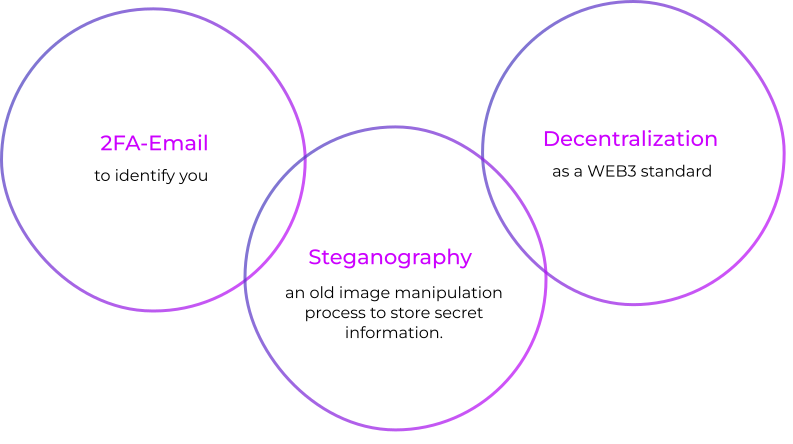
2FA and your email are used together with personal information hashes to identify uniquely an individual.
Decentralization is used to separate information into a point dataset (the pixels from steganography process) and blueprint media (the image) and store them in two different places.
Steganography is used to capture random pixels from an image and alter them to store the secret key or password.
zobiki demo
Checkout how a backup and a recovery processes are easily done. This video shows step by step how to complete the full process in less than 5 minutes.
Pricing plans
Basic - Free
One single image and one text up to 256 characters. You can store a full mnemonic code or your key in hex format. Great to start with in the crypto world.
€ 0 /year
Intermediate
Need more space? Get the package with 4 storage texts and two images. This is perfect for multiple wallets and keys as you grow in your crypto space.
€ 12 /year
Unlimited
You are a pro and want all the backup flexibility. Pick the unlimited plan for all your needs.
€ 24 /year
FAQ
You can pick any image as long as the size is bigger than 200x200 pixels. Our system will let you know if the image is the right size. You should avoid single color pictures (i.e. a completely blue or completely black image) and prefer images that have lots of variations in it. We suggest picking an image that you will easily remember in case you need to restore your keys, since that may happen months or even years later.
Since the image does not contain any information, and it is only used together with the points info to restore your key, you can store it anywhere as long as it is a safe place and does not get lost. Do not store it on your local computer as this can break and therefore lose your image. Your cloud photo album, or a cloud service are the best places as they can store thousands of images and you probably already have such service.
Definitely. The image does not contain any information so you can send it around, however remember that some software may resize/compress your image when sent. These processes will remove important information from the original image and therefore cannot be reused to restore your key. Make sure when you send the image the software you use does not alter your image in any form.
No, we do not store your personal information. Your information are processed only on your browser and we convert it to a “hash” and we use that “hash” to identify you. We then store that “hash” on our server together with your email to uniquely identify you.
We use your email to send you temporary tokens, and confirmation of storage and payment information. We also do not like BOT and the email gives us a chance to avoid storing unnecessary information on our servers. We will never contact you except for the items described above, temporary tokens, payment and confirmation of storage information.
Yes you can, however we discourage you to do it because if someone is able to hack your storage area they will have both the pixels points and can get access to your images as well. You will put them in a position to restore your key very easily.
Zobiki approaches the backup and restore service from different points of view. One is about getting rid of passwords. We know it is a pain to remember passwords, and not only you can forget them, but you can also be hacked easily if your passwords are not strong enough. The second is decentralization. When you use any other service like a password manager or similar services, the full key is stored on their server therefore if they get hacked sometimes soon they can decrypt all the info stolen, and find out your key. If our servers get hacked, they will get a bunch of pixels which are kind of useless.
The only thing we ask you is to keep an image in a safe place!
Get in touch
You can get in touch by writing at getintouch@zobiki.com or write a message by using the contact form below.
All fields with an (*) are mandatory.

© 2024 Zobiki - All rights reserved - Privacy Policy - T&C